Creating a Route
This guide explains how to use the Creating a Route feature in FlyLAT.
🔧 What Is It?
This tutorial will guide you through how to create a route and what is the benefit of having a route over free flight
🛠 How to Use
1. Open flyLAT desktop app
2. If not logged in, log in
3. Click on Routes which is located at the top bar menu
4. Click on New Route. Found near the top of the page, on the left
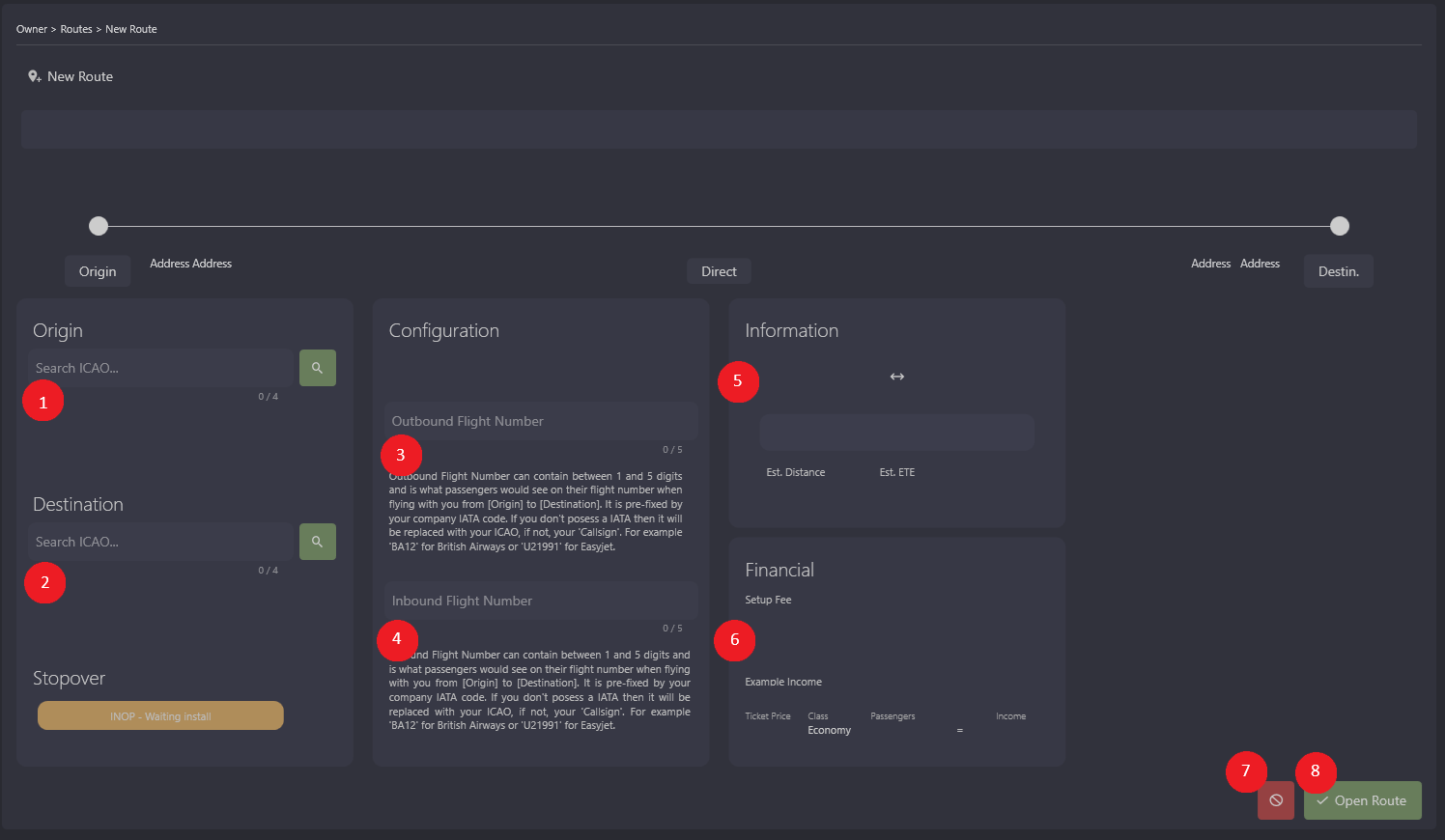
5. You will need to enter ICAO in 1 and 2 and press the GREEN search button to verify the airports (labelled in the screenshot)
6. Enter inbound and outbound numbers (3 and 4)
7. You will now get full information (5 and 6)
8. Once you are ready to create a route, press on Open Route (8)
💡 Tips
- You will need to verify the route to have AI fly it and create passive income
📌 Did You Know?
- Your AI crew can also fly the route once its verified
- Profits can vary depending on time of the day and year
- If more than one airline does the same route as you, remember that there is a limited number of passengers that will use that route. Check before you fly on our portal.