Fleet Dashboard
This guide explains how to use the Fleet Dashboard feature in FlyLAT.
Introduction
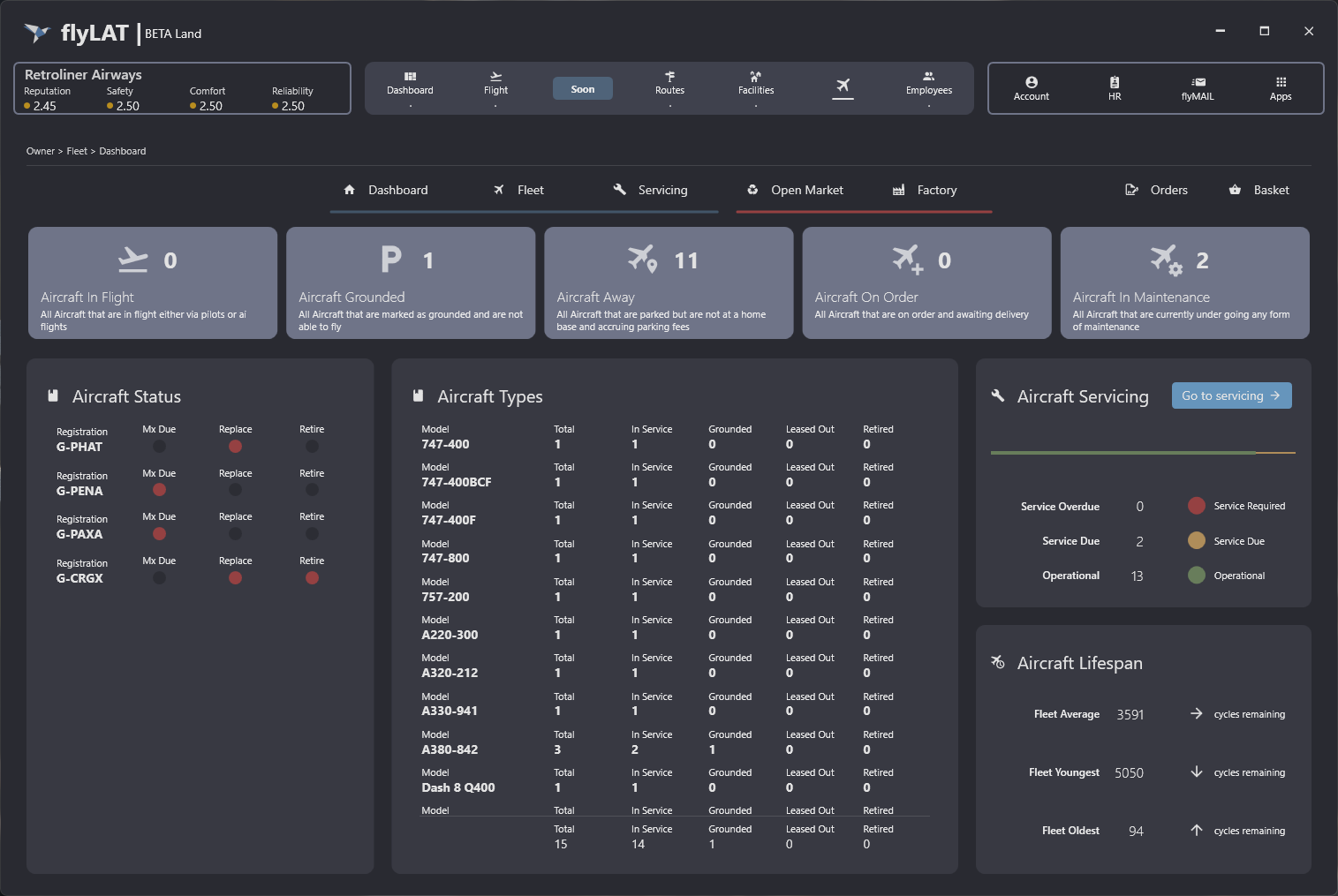
Welcome to the fleet dashboard. Everything you need to know about your fleet at a glance is here. From the number of aircraft in the air to how many aircraft need to be serviced 'sent for a check', or even which aircraft are coming up on their late life. This dashboard shows all of this at a snapshot view. It's worth noting that as we progress, this dashboard will also be updated and in some cases completely overhauled.
Aircraft Counters
Along the top of this screen, you will see 5 status cards. Each card represents a unique status for your fleet and can be used to understand just where you're up to. For the smaller airlines this might not be as utilised, however for the larger companies it will be more beneficial while you've got many pilots on the go with forever changing fleets.
Aircraft in flight
No matter who is flying the aircraft, it's still in the air, there is no denying that. As a completely separate metric from your 'active flights', this view does also include the aircraft being ferried. Ferried being the term for "transferring" an aircraft that's empty from A to B. So if your flight counter and aircraft in flight counter mismatch, this is likely why.
note: flight counter is not on this screen
Aircraft Grounded
You wouldn't be wrong for thinking that this is the opposite to aircraft in flight, as these aircraft are indeed on the ground. But this is not a parked counter. Grounded means the aircraft has been deemed un-fit or un-willing to fly by yourself. Often used as a way of protecting aircraft from being taken by employees. Simply put, aircraft grounded means no-one is able to fly them.
Aircraft Away
This metric is your parked counter but with a twist. Where we have hubs, we have free parking. Where we don't have hubs, we don't have free parking. This counter is there to show you how many aircraft are parked at non-hub locations, albeit even if they're only there for a couple of hours.
Aircraft On Order
I don't think this needs an introduction. You've got yourself a new shiny plane. Maybe even two. Who knows? Point is, you can bask in all of it's glory with this status counter.
Aircraft In Maintenance
Considering how long some maintenance schedules are, this counter can be quite handy dandy for understanding where your fleet is up to and how much it's costing you. Maintenance is the most disruptive to your fleet as if they're on the ground, they're not making you money and in fact, costing you money instead. Again a useful stat for the much larger airlines who can't quite keep track of every aircraft, something the smaller airlines can't complain about.
Aircraft Status Panel
Our newest panel to join the line up, the status panel is design to show you early warnings of aircraft that need your attention. The three things it will warn you about are: Maintenance Due, Aircraft is heading towards end of life and Aircraft is at the end of life. These are indicated by a red light along with the registration of the aircraft.
Mx Due
Mx is just short for maintenance. So you have maintenance due on this aircraft. This will be co-habit another warning status over in the 'Aircraft Servicing' panel, something we'll get to shortly. If this light is on, it means the aircraft is coming up on a required 'check' or is already due or even overdue a 'check'.
Replace
While the term is quite stern, it doesn't actually mean you NEED to replace this aircraft. It's merely suggesting you should start to think about what you're going to replace this aircraft with, if at all. When this light comes on, you're coming up on the twilight phase of an aircraft life.
Retire
Again, even though this is quite strong in it's suggestion, you don't NEED to retire this aircraft. Unlike the replace light, this is a little more serious. An aircraft is at the end of it's useful life. As of v0.8 we now have a few options in terms of what you can do.To cover them:
- Sell
- Retire
- Overhaul (overhauls the aircraft back to life)
- Convert (converts to freighter if available)
- D-Check (restores little health)
Aircraft Types
Not a lot of explaining is needed with this, you're simply looking at the different types of models you have and the rough status of them.
In Service
This is your aircraft as normal operations would see.
Grounded
Exactly the same as the Aircraft Grounded Status Card, the number of aircraft grounded for this model.
Leased Out
In Development
Retired
In Development - Coming soon in a v0.8 patch
Aircraft Servicing
This panel gives you a much more focused view on your fleet servicing (mx). Where those are service due means you're within a few hours of x quantity of aircraft needing a check. Overdue is self explanatory.
Aircraft Lifespan
'Cycles' refers to the flight cycles of an aircraft. In simple terms, the amount of flights it has.
So your fleet average, as shown, 3600~ flights remaining while the oldest aircraft in your fleet is 94 flights remaining and the youngest being new at 5050 flights remaining.
← Back to Fleet