Aircraft Conversions
This guide explains how to use the Aircraft Conversions feature in FlyLAT.
Introduction
Aircraft reached the end of it's life as a pax, costs you too much in maintenance and isn't cutting it with your fleet strategy? Have you tried converting it? A less than common but certainly rich in presence method of aircraft afterlife, converting pax into cargo airframes has become quite the thing. Now that's supported in flylat the icon you're looking for is this:

If you aircraft has this icon in your fleet management then you're staring at an aircraft that has a second chance.
Area
Fleet Management > Fleet > Select an aircraft
Conversion Information
On your asset dashboard, the first screen that pops up after clicking into an aircraft, you've got some "options". Overhaul options and Conversion Options. On this tutorial, we're focusing on Conversion.
At the indicated lifespan and flight cycles, your aircraft will become available for conversions where it can be stripped down, re-enforced and turned into a prime time delivery boy. Though you must know, this action is not reversable and there is nothing we can do for accidental conversions as it's a completely system driven aspect. I just hope you can sell it for a pretty penny to re-coop that mistake.
How-to
There are two ways this can go. Either, your aircraft is already at a listed MRO facility or it isn't. MRO being maintenance, repair & overhaul facility. These facilities are not purchasable, you MUST ferry the aircraft to one of these facilities for the work to be carried out. That also means there's two sets of instructions. Let's break that down.
Step 1 - Convert
No matter where the aircraft is, to start all of this, head into fleet > select your aircraft. On the right hand side, you will have "Aircraft Actions". It's here where you'll see a "Convert" button in the caution colours (yellow). To get started, click on this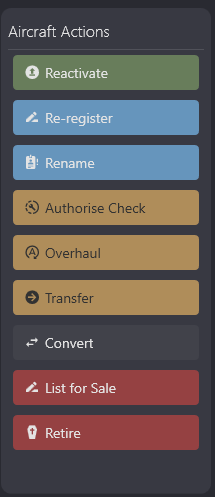
Step 2 - Non MRO Facility
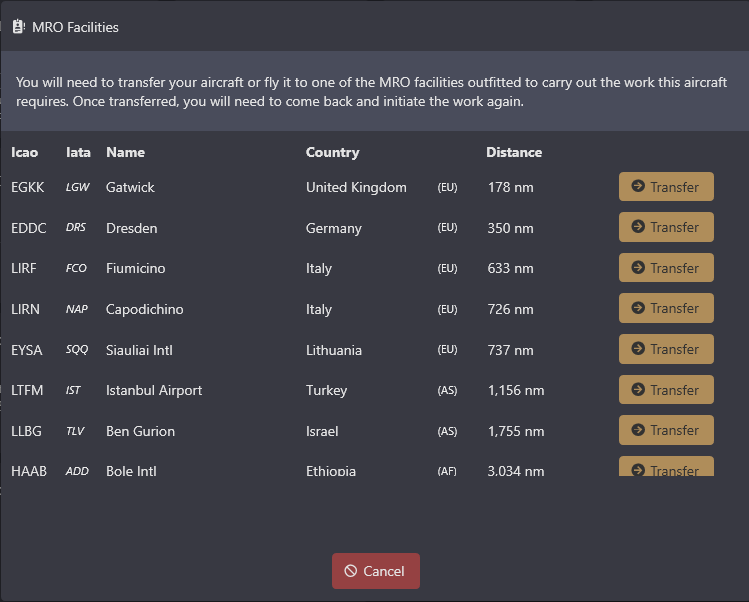
If you aircraft IS NOT at a MRO facility you will be left with this screen, ordered by closest facility. The list is scrollable with around 20 facilities world wide. There is no limit at these facilities. Once you're happy with the facility, click transfer and off your aircraft goes to this facility.
please note: transferring your aircraft does not automatically authorise the overhaul work. You must wait for the aircraft to arrive before re-trying the Convertoption, details lined out in step 3.
Step 3 - Authorisation
Assuming you're happy with the details shown on your aircraft dashboard, price, time and conversion details. Once your aircraft has arrived (if it needed moving), click Convert again and you will be prompted if you're sure you want to convert the aircraft. From the moment you click YES, that aircraft becomes unavailable until the date shown on the dashboard, the price will be automatically deducted from your cash account (in-game account) and will otherwise be un-usable.
← Back to Fleet