What is a dashbaord
This guide explains how to use the What is a dashbaord feature in FlyLAT.
🔧 What Is It?
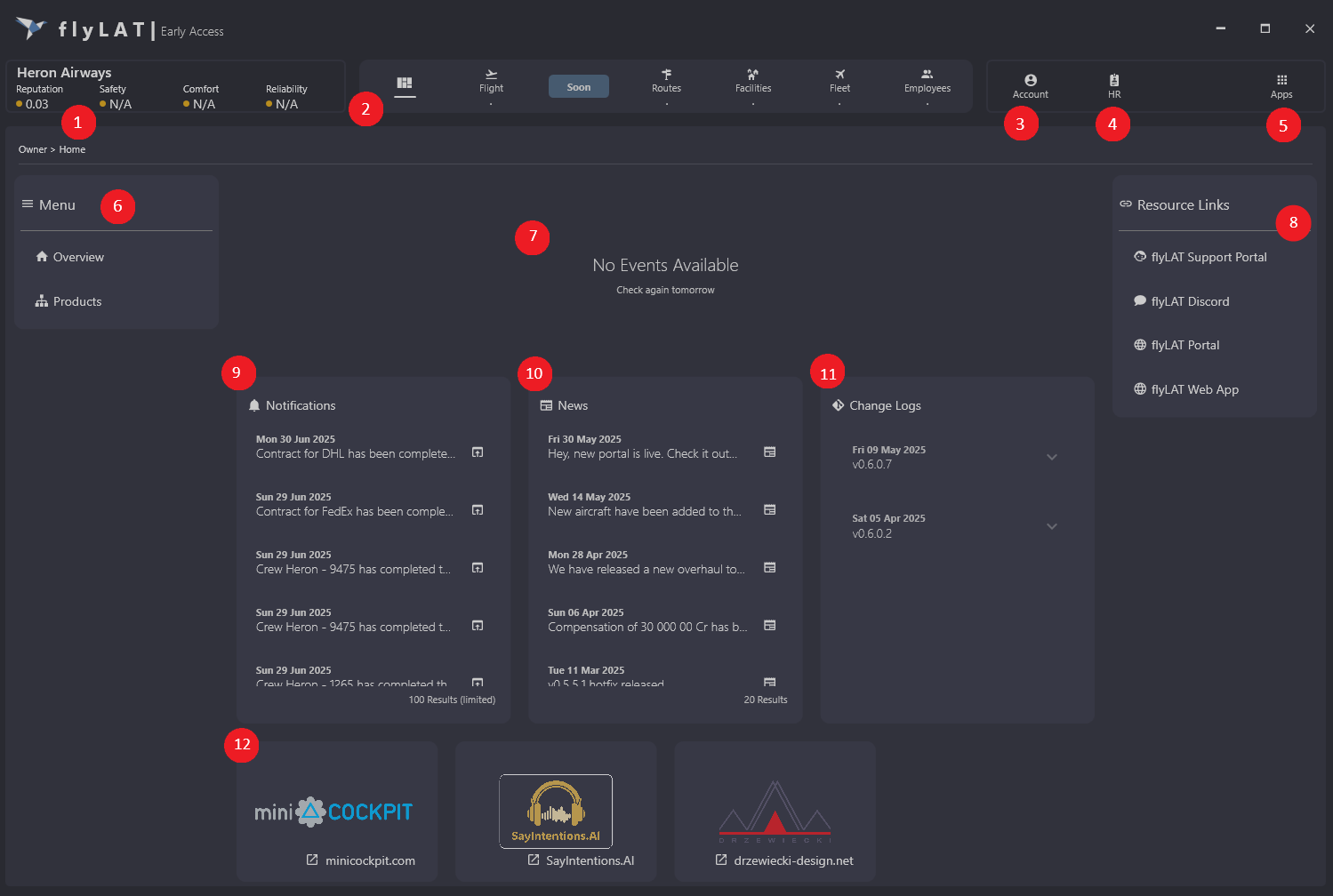
Dashboard is your home page essentially. I know it doesn't look like a proper dashboard but first we want to focus on bringing in features that then will have some data to show you on the dashboard. Please note that this dashboard is a temp dash
🛠 What's what
- This is your airlines rating, please note that not all ratings have been switched on just yet. A lot will come with MX and Schedule update.
- This is your navigation menu
- Click here to view your account controls
- This is where you can view your stats and flight logs
- use this to navigate over to other in app apps (CEO Only)
- Basic navigation menu with new features coming soon
- If there is an event, it will show you what it is, feel free to recommend an event to us on our discord channel
- Useful resources
- Your company notifications
- flyLAT news, soon this will switch over to your airline news
- Our change logs (These have to be hard coded right now)
- Links to our official partners
💡 Tips
- Some functions might appear and might not be in this tutorial in the near future
- This is the CEO dashboard and some functions for employees might not be visible